Mulai cepat rea-video: bedah video pertama dalam 5 menit
Instal rea-video dengan satu kalimat dan baca laporan breakdown pertama Anda: panduan WorkBuddy/Claude Code, tinjauan gambar menaikkan keyakinan 57%→79%, dan model pembaca video untuk audio.
Diperbarui
5 minutes: install rea-video, break down your first video, get the report.
1. Install and break down in one sentence
Open Claude Code, Codex or WorkBuddy and send this (swap in where your video is):
Install https://github.com/JuneYaooo/rea-video , then break down this video: /path/to/video.mp4
The agent installs any software it needs by itself. No video on hand? Change the second half to “try it once with dual_role.mp4 from the repo”.
2. What you get
A 19-second video takes about 1 minute. The agent first replies with a one-line verdict:
Mixed production: code/template rendering 59% + AI-generated video 41%; real footage used: UI screenshots (11.2s), screen recordings (8.2s); sound: voice; editing & packaging: 13 subtitle lines, 15 text labels, 3 stickers/GIFs
Then it gives you a folder. Look at this storyboard first:
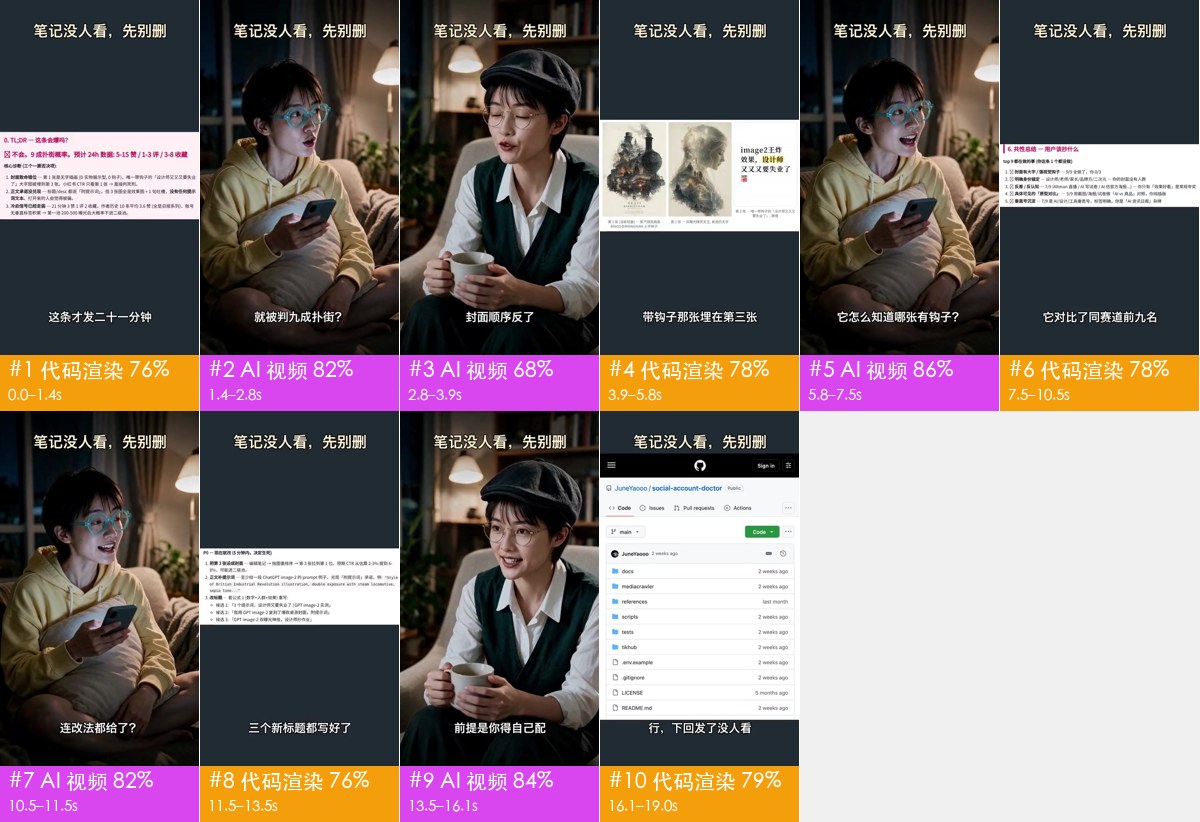
The full report is report.html in the folder — double-click to open it. For how to read it, see Reading the breakdown.
3. Let it look at images for better calls
With an agent that can see images, like Claude Code, it will look at screenshots of any shots it’s unsure about. For the sample above, that raised confidence from 57% to 79%.
Want sound analysis: add a model that can watch video
The agent only looks at screenshots; it can’t hear the sound. To learn about the voiceover, music, sound effects and how the opening hooks you, add a model that can watch video, such as Gemini or Doubao:
Help me set up a model that can watch video (Gemini / Doubao) for rea-video. Tell me where to put the key, and I’ll fill it in myself.
Restart the agent after filling it in. This model is billed separately.
If a shot is judged wrong, just tell it: “Shot 3 is stop-motion, not AI” — it will fix it.
Next steps
- Reading the breakdown
- Remake from the results
- Remake a reference video: hand it to capsule-cinema to make from the original